AI Tools for Engineers: Run Several Agents, Not One
A guide to AI tools for engineers that argues for orchestration over a single assistant, with a look at how dynamic providers load arbitrary agent CLIs.
Plenty of lists of AI tools for engineers end by crowning one winner. AuricIDE gives a different answer: one layer for several agent CLIs, because code generation is not the hard part.
At 3 p.m. the problem becomes obvious. One terminal tab is refactoring a service. Another is working through an incident. Both agents produce useful output, and the engineer becomes their clipboard: a stack trace goes into one tab, an interface change into the other, then comes the diff, then another switch.
Neither tool is broken.
Would a better single assistant fix that?
Not by itself, because faster code has not turned into faster delivery. MIT Sloan's summary of the GitHub research covers more than 100,000 developers: autocomplete tools increased coding activity by 40%, and adding async agents pushed it to 180%, yet the boosted coding work led to just 50% more projects and 30% more actual releases.
The effect also changes with the work and the people doing it. METR's randomized trial found that allowing AI increased completion time by 19% for 16 experienced open-source developers on mature codebases, as reported in the METR paper on arXiv. A Copilot experiment at Microsoft, Accenture and a Fortune 100 manufacturer found 26% more completed weekly tasks across its three experiments, according to MIT Sloan's write-up. The reported comparison of those studies captures that tension.
Standardizing on one winner tidies the setup and leaves the two-tab afternoon intact. The friction is not tool quality. It is running several tools that are already good with no shared view. That feels like holding two conversations at the same dinner table: each one is fine, and the tiring part is turning to the other speaker every few minutes to repeat what was just said. A half-finished investigation cannot move to another agent, and other ready work waits in the same session.
That is the case for a layer above the CLIs, one that coordinates the tools and leaves their differences alone. The trade-offs of running agents as a fleet are covered in AuricIDE's approach to running multiple AI agents.
How does AuricIDE load an agent CLI it has never seen?
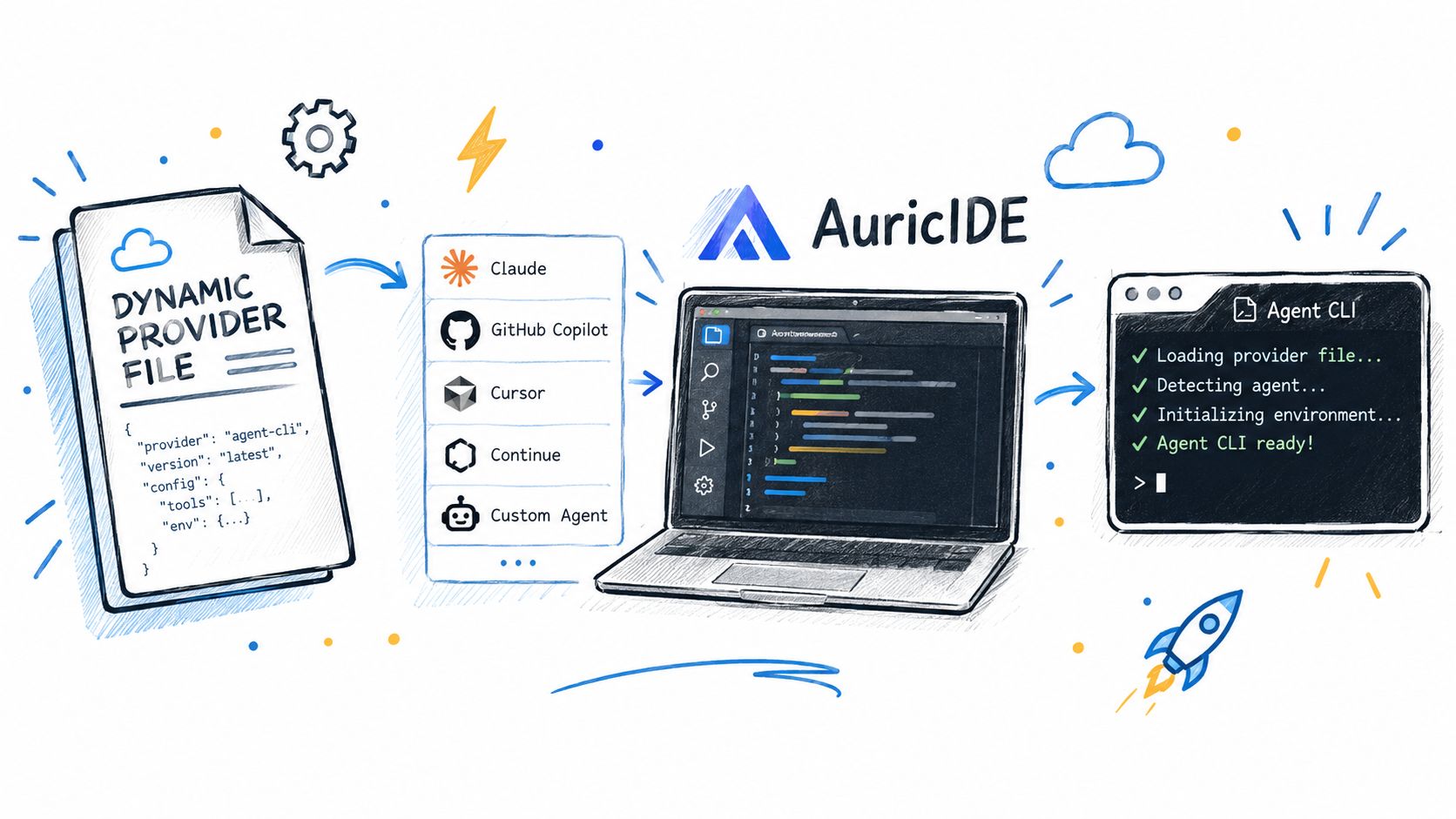
Through a dynamic provider: a JSON file that tells AuricIDE how to start one external agent CLI. Importing it under Settings → Agent validates the file against the provider schema and registers it immediately, with no recompile, no plugin API and no restart.
The path through the app is short. Open Settings, choose Agent, then find Agent Providers. Registered providers appear there as labeled chips. Select Import Provider… and choose the JSON file. AuricIDE reads it, validates it, and refreshes the list. The new provider appears at once. A success toast names it. Nothing else needs restarting.
The file stays small. Each field answers one launch question.
idandnameidentify the provider in the interface.executableandargumentssay which process to launch and how.infolists the models and permission modes the CLI offers, with their defaults.versionCheckis the command AuricIDE runs to see whether the CLI is installed.promptTemplatesays how the task prompt reaches the CLI.
The file describes an adapter boundary. It does not rewrite the CLI. The CLI keeps its own harness, prompt rules, permission behavior, and models. AuricIDE starts it as a local process and coordinates project work around it. Each process stays separate, so one crash does not take every agent process with it.
“Harness” is the broad industry term. “Dynamic provider” names AuricIDE's mechanism. AuricIDE is a meta-harness, or harness orchestrator, above the harness each CLI keeps.
A provider file can also be copied straight into the providers folder. That route is slower. The file takes effect at the next app start, so a valid provider can look absent until AuricIDE restarts. Nothing is wrong with the file.
Provider setup and project work are separate. AuricIDE's MCP server exposes goals, tickets, requirements, test cases and dependencies to agents that connect to it. The provider tells AuricIDE how to start a CLI. Running agents then share that project workspace.
What happens when a provider file is wrong?
The entry path decides what appears. An import from Settings → Agent shows an error toast with the parse problem, such as Invalid provider config, and nothing gets registered while the existing list stays as it was.
A file dropped into the providers folder behaves differently. AuricIDE parses each file on its own during startup. If one is broken, AuricIDE skips it, writes one line to stderr, and continues loading the other providers. The desktop interface shows no error. The list is simply shorter. That silence is easy to misread as a missing file or a failed installation, and a provider that never registered is a different failure from an agent that ran and failed, a split that AuricIDE's article on the config layer around coding agents walks through.
One identifier has another rule. The built-in provider id is crush. An imported config that claims crush is refused. A dropped file that claims it is ignored. In both paths, the file cannot replace the built-in provider.
What does it cost to sit above the agent?
The price is less control over each CLI. AuricIDE loads external CLIs instead of shipping its own agent. Model behavior, system prompts, and tool definitions stay inside each CLI.
That boundary preserves each harness and its failures. Output quality still depends on the selected provider and model. Arguments can change. A version check can fail. A CLI can exit. AuricIDE can coordinate the process, but it cannot make different CLIs behave the same way.
The dropped-file path is the sharpest example. One bad file removes one tool from the visible list, while the only clue goes to stderr. Shared setups therefore need provider files checked before distribution. The file is small. Its operational effect is not.
Permissions need the same care. Mode names come from each provider file. A bypass mode may be called “no guardrails” in one file and “no sandbox” in another. Those labels belong to the provider. A shared fleet view does not create a shared safety model. The selected mode still needs review for each CLI before assigning work.
A further process boundary comes with the layer. Each agent runs as its own local process, which isolates failures but adds another place to inspect when a run stops. The task, arguments, version check, and process exit can each be the cause. Orchestration adds overhead of its own, which AuricIDE's piece on AI agent cost breaks down for spend.
For one agent on one small task, this layer may cost more attention than it saves. The design earns its place when parallel work itself has become the problem.
What still holds when the CLIs change?
Judge the coordination layer separately from its agents. A leaderboard cannot show whether several live tasks make sense from one place.
Three questions expose the design quickly. Does the layer build its own agent, or coordinate external ones? Can a new CLI be added through a validated file? When a provider breaks, does the failure become visible, or does that provider simply disappear?
Commands will change. So will models. So will permission labels and version checks. Keeping those details in one provider file means a CLI change does not require a workspace rewrite. Only the adapter needs those launch details. The harness remains the CLI's responsibility.
The final question is operational: when three processes are active, can an engineer see what needs attention without opening all three? That is the job the coordination layer must earn.