Coordinating Multiple AI Agents for Real Engineering Work
A practitioner's guide to coordinating multiple AI agents: architectures, handoffs, harnesses, and trade-offs for running coding agents as a fleet.
The default advice around multiple AI agents is backwards. A second agent does not automatically make work faster. It often adds handoffs and waiting, and it gives two machines more chances to disagree about what changed.
A recent forecast for the global multi-agent AI systems market puts that shift in context, with growth from about $5.1 billion in 2023 to $7.9 billion in 2024, and a projected $155 billion by 2032 at roughly 44.8% CAGR (forecast source). The money is moving, but engineering teams still have to decide where the seams go. That seam is where the work lives.
Why Adding a Second Agent Often Makes Things Worse
Teams spend the saved time coordinating. A clean refactor can drag. One coding agent finishes in 14 minutes. Add a reviewer, and the same change takes 47 minutes. The models are not thinking longer. The reviewer must first absorb a 41-file diff and catch up with codebase changes made while it waited for the coder to finish. It then fixates on a lint warning the coder already suppressed downstream.
The wrong guess
You might blame a picky reviewer. Each handoff adds overhead. It shortens, reorders, and drops some context. See multi-agent coordination: the issue is the handoff, not the model brand.
Practical rule: if the extra agent cannot act on a compact, stable handoff, the chain is already expensive.
Think about a kitchen line. One cook may plate slowly and still finish dinner. Two cooks can turn a simple meal into a mess when they keep passing the same pan back and forth.
The Building Blocks of a Multi-Agent Setup
A multi-agent setup depends on what happens between agents. The harness, skill, chain, shared state, and attention signal each cover a different part of the handoff.
What each piece does
A harness runs the loop. It starts an agent, gives it tools, and trims the prompt between turns. A coding CLI works inside a harness when it reads a task, edits files, and returns a result.
A skill is a reusable procedure. A "prepare handoff notes" skill might require touched files, open questions, and test status.
A chain sets a fixed order for agent steps. One step plans, another edits, and another reviews. The contract between steps controls how well the chain works.
Shared state keeps work that must survive one turn. A file, directory, or structured log can hold it. Agents use that record for goals, tickets, requirements, and test cases, so they do not rebuild the same picture after each prompt.
An attention signal gives a clear target. A failing test name, file path, or line number works. Without one, the agent gets a prose dump and must guess where to look.
A useful handoff names the file, the failure, and the next action.
That vocabulary matches the way LLM agent architectures describe the split between control loop, state, and orchestration. In AuricIDE, external CLIs load as dynamic providers through Settings -> Agent, with schema validation and no recompile.
How Agent Fleets Actually Coordinate
Fleets use a few common patterns. Each pattern adds work at a different point.
Pipeline, dispatch, and role split
A pipeline sends work through agents in order. Each step has one input and one output, so the run is easy to trace. Each step must wait.
A dispatch pattern uses a router to pick an agent. It handles uneven work better, but the router adds another failure point. If it misreads the task, the wrong agent gets context it cannot use.
A role split assigns specialists to the same problem at once, such as a coder writing while a reviewer follows the same change. One side often waits while the other writes. They meet at a merge step that nobody clearly owns.
| Coordination patterns and their real costs | Latency Cost | Shared-State Design | Failure Surface |
|---|---|---|---|
| Pipeline | Every step waits for the previous one | Typed handoff bundle | Drift between stages |
| Dispatch | Router adds one more decision point | Routing log | Wrong assignment |
| Role split | Merge step appears at the end | Merge surface | Idle time plus conflict |
An agent can do good work while the handoff still makes the whole system slow. Teams pay for the seam through extra latency and merge work.
Local Versus Cloud and Where the State Goes
Local runs keep the working tree, live tail, and project record on the user's machine. Cloud runs move more state to a hosted workspace.
AuricIDE uses the local model. Its agents run as PTY child processes on the desktop. Project data stays in a SQLite file inside the repository. A fresh clone includes the code but leaves the work record behind. Users keep their data and control on the local machine, while long histories add context weight and the live tail stays visible only on the host running the job. For a tighter look at the local model, see local AI agents.
| Local vs Cloud Agent Execution | Local | Cloud |
|---|---|---|
| Context and history | On the user's machine | In a hosted workspace |
| Live terminal tail | Visible on the host | Surfaced through the service |
| Fresh clone | Code comes over, work record stays local | State can be reconstructed centrally |
| Trade-off | More privacy and control | Easier remote access and sharing |
Running a Chain Step by Step
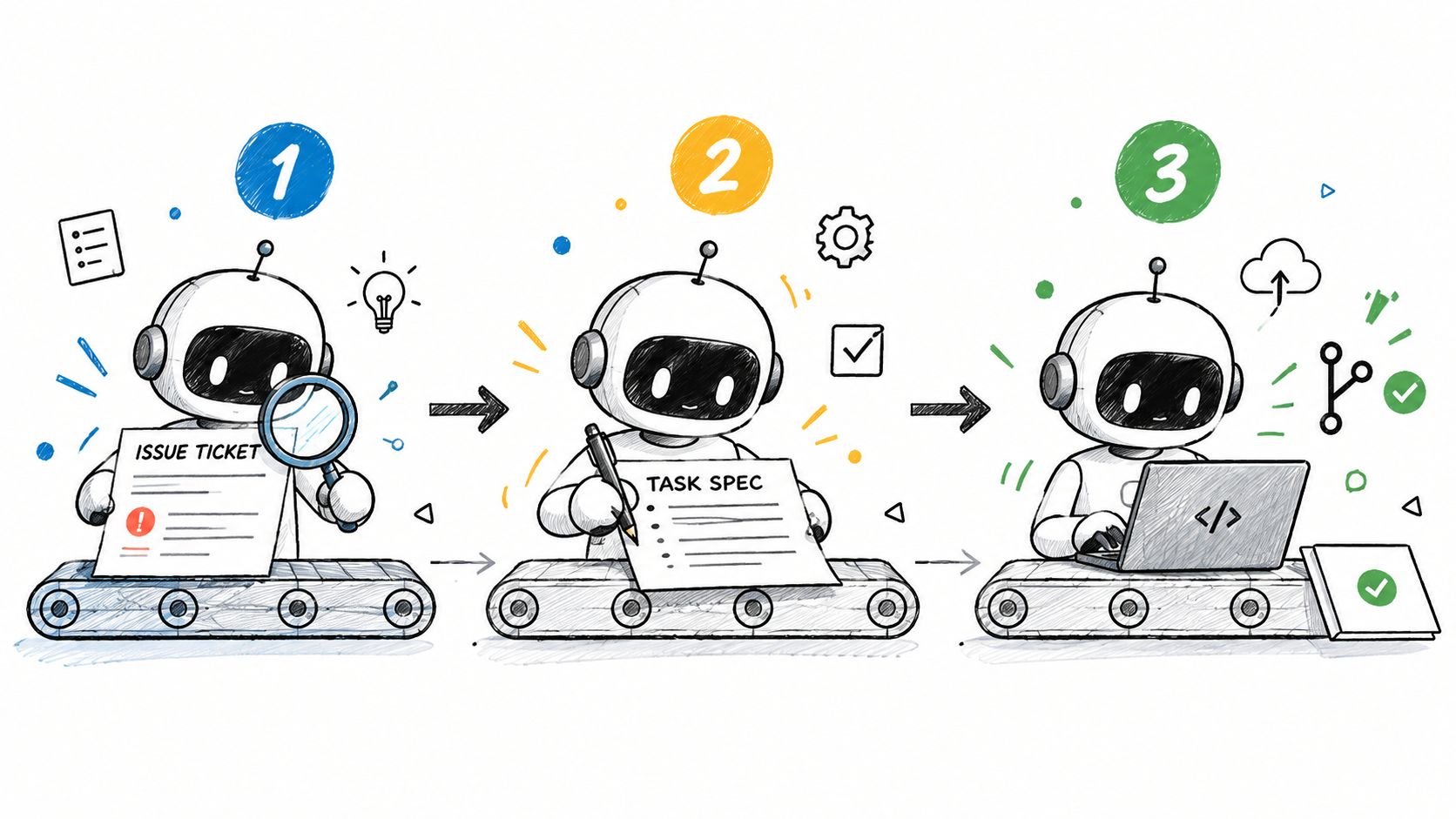
Chains start with a task spec. Each step passes work forward.
The first agent reads the issue and writes a short plan. The second gets that plan and the last 2000 characters of the first step's terminal tail. It edits files in a worktree. The third gets the diff and the coder's tail, then approves the change or asks for fixes. If the handoff leaves out a file path, the next agent never sees it, and the review can fail without showing why.
What crosses the boundary
The planner returns a short spec. The coder needs that spec, the current file set, and the latest terminal tail. The reviewer needs the diff and enough tail to see failures and anything suspicious. Extra material leaves less prompt space.
A runner should report a non-zero exit as a failure and keep the exit status attached to the returned result. A cut-off error still helps when it names the right file. A timed-out reviewer that returns approval without comment is worse than no review at all: it looks like success, and the broken change keeps moving forward.
A handoff should name required inputs, outputs, and failures.
Keep the spec short. Keep the tail bounded. Make the next step fail loudly when the previous one did not finish cleanly. Agents work better with bounded input and loud failures, even if the stack feels less conversational.
How Multi-Agent Systems Fail in Practice
These systems fail in a few common ways. Use a guardrail for each failure.
The failures worth naming
Context drift starts when the third agent uses an old summary after the code has changed. A tail-fingerprint check can compare the latest tail fragment with the fragment named in the handoff.
Tail truncation can hide an exception in the first half of a log. The key line drops out, so the next agent assumes the run passed. A required exit-code field still shows failure when the log is incomplete.
Role confusion starts when a reviewer edits code instead of reviewing it. A prompt that blocks file writes is crude, but it keeps the role clear.
Silent retry causes the most damage. A timed-out agent returns text that looks like an answer but contains no useful artifact. A checksum on returned artifacts catches that empty success.
A recent study of multi-agent failure modes found 18 fine-grained failure modes across 150+ tasks, grouped around specification ambiguity, organizational breakdowns, inter-agent conflict, and weak verification (ICLR 2025 paper summary). The four groups show where problems cluster. More agents give teams more chances to misread an ambiguous handoff.
AuricIDE uses one attention metric with this order: error > blocked-on-input > stalled. It tells a person where the fleet needs help. Chat logs take longer to scan. People also struggle to scan varied failure terms under pressure.
What to Standardize Before You Add Another Agent
Set the seam before the fleet grows.
A team can add agents before it defines the handoff, the owner of shared state, or the response for each failure. The setup may work briefly. Each new step then adds a hidden cost in context, latency, and trust. Start with one fixed handoff format, one shared state surface, and one failure vocabulary that everyone uses the same way.
The harness becomes the job boundary. It starts as a wrapper around a CLI, but it also decides where one job ends and the next begins. Put the human checkpoint at that boundary, because some work needs approval before automation continues.
Before adding agents, check that another tool could still read those contracts six months later.
AuricIDE gives developer teams a local desktop workspace for running CLI coding agents as a fleet, with shared project state, chained handoffs, and schema-validated agent providers. If the seam between agents is the problem that keeps showing up, AuricIDE is built to make that seam explicit, inspectable, and easier to standardize.