Agentic IDE Architecture and Fleet Control
Discover how an agentic IDE orchestrates CLI coding agents as a fleet. Learn process state tracking, attention metrics, and AuricIDE architecture.
Three agents start cleanly. One fixes a failing test. Another updates a dependency. A third works through a ticket. The developer steps away. On return, all three tabs show similar last lines. One agent has failed, one needs input, and one may be stuck. Finding out means opening every tab.
That exposes a useful distinction: the file view sees repositories as code and documents, while the process view sees running agents as active work with separate lifecycles.
An agent context management workflow can preserve information, but preserved text still doesn't reveal which process needs attention.
A useful agentic IDE test is simple. Does the IDE treat each running agent as a first-class object? Does it do the same for process state? Adding a chat panel does not pass.
The Problem With Unseen Agent States
A developer comes back to several agent sessions. The terminals show recent output. One process may be done. Another may need input. A third may have stopped making progress. Similar logs can hide very different states. Each state needs a different response.
A transcript shows what an agent printed. It does not show the current state with enough trust. The process may have ended or failed. It may also have stalled or stopped for input. A quiet terminal could mean success, a confirmation prompt, or a hung process.
Practical rule: A terminal tail shows activity. It does not provide a status model.
Multi-agent work needs both views. The file view shows the work products. The process view shows which agents need action. Without it, developers inspect each pane.
The workspace should answer a direct question: which process needs help?
That requirement also changes how teams use agent context management. Preserving prompts, files, and prior output helps an agent resume work, but retained context does not reveal whether its process is active, waiting, failed, or stalled. State tracking closes that gap. It turns each running agent into an item a person can check.
An agentic IDE includes process state in the workspace. Skip that, and handing off work just adds more tabs to watch. Each new agent adds one more.
Why a Chat Sidebar Misses the Point
A chat sidebar helps you inspect prompts and responses. Process control needs more detail.
An agent can be idle, in an error state, waiting on input, or stalled. The last log message may look normal in all four cases. The user needs the lifecycle state before deciding to review, answer, restart, or wait.
A warehouse dashboard makes the difference clear. A worker's note records the last task. A live board shows blocked orders and tells a supervisor where to act as more agent processes run at once.
AuricIDE's multi-agent coordination model treats the running process as the unit that needs supervision. Agents run as local PTY child processes. Success or failure comes from each process's exit status. The interface doesn't expose a raw numeric exit code as the product's status signal.
Process state shows where to look. It cannot prove that an agent's code is correct. Reviews, tests, and permission settings still matter.
How Fleet View Ranks Agent Attention
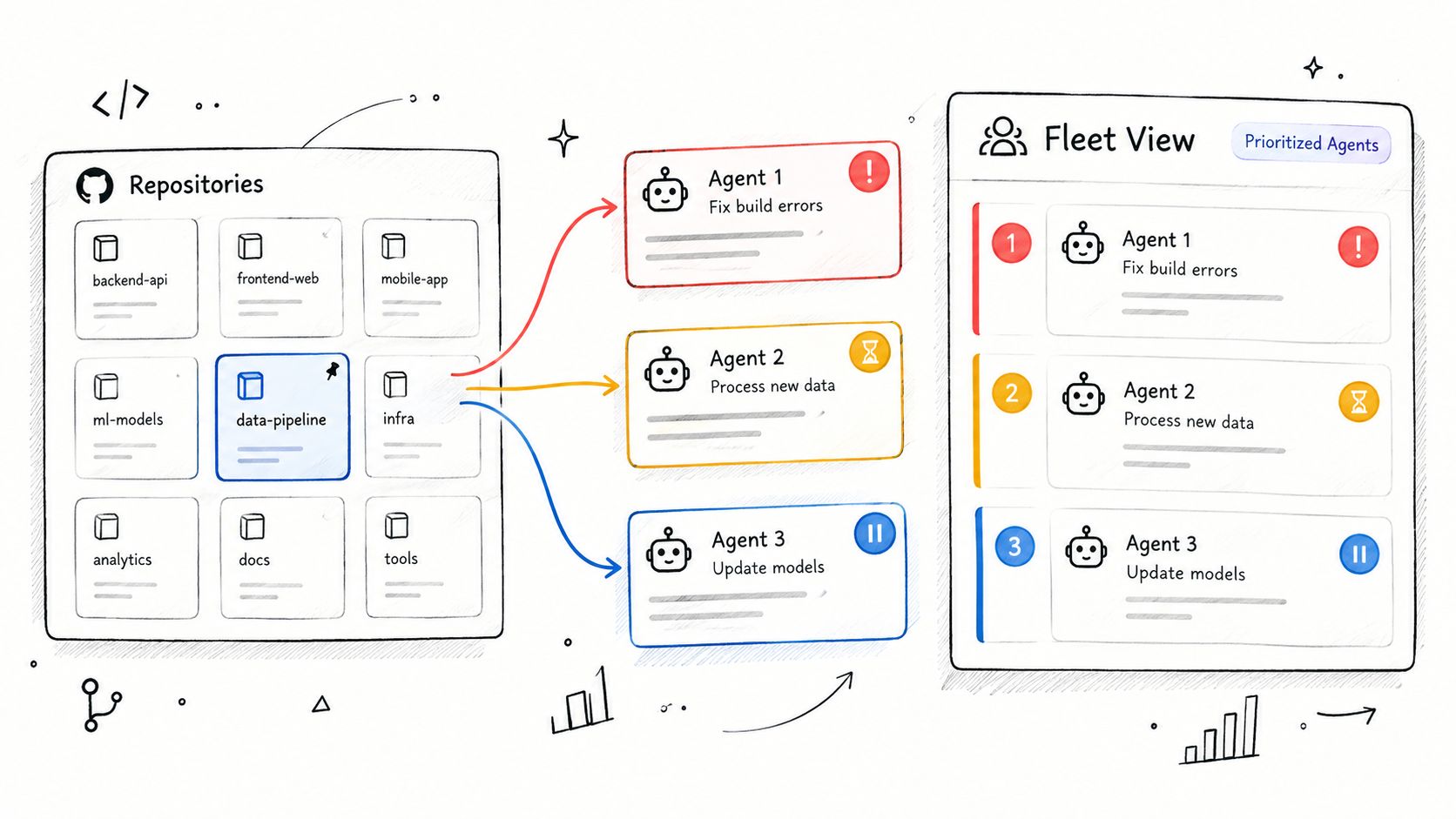
AuricIDE's Fleet view groups agents by repo. It turns their states into one attention badge for that repo. The ranking is error, then blocked-on-input, then stalled. A failed process ranks above one waiting for an answer. A waiting process ranks above one that has stopped progressing.
The order supports quick triage. A repo with an error comes before one with a stalled agent. Starred repos stay visible as app-like tiles. File recency does not control them.
Launch setup keeps two ideas separate:
- Launch preset: A reusable skill with a provider, model, and permission mode. It controls how the agent starts.
- Discovered skill: A skill found by scanning set repository folders. It supplies a prompt and has no provider, model, or permission settings.
An imported prompt cannot set its own run policy. The launch preset provides the provider, model, and permissions. The discovered skill provides the prompt. This distinction matters when AI agent monitoring must identify which process needs review and which merely has available work.
Fleet view still works with terminals. It saves the user from opening every terminal. The user can go straight to the one that needs action. Chat sidebars lack that process view.
The pattern also addresses a workflow gap identified in independent research on AI coding agent adoption, which describes a choice between IDE-first work and terminal-first agents in existing repositories. A fleet screen adds orchestration without forcing every task into one editor.
The Architecture Behind Local Execution
AuricIDE runs agent command-line tools locally as PTY child processes. Schema-checked JSON provider files define how each process starts. Users register a provider under Settings > Agent. They can import it without recompiling the app or building a plugin API.
AuricIDE acts as a meta-harness. A harness wraps one agent command-line process. AuricIDE uses a dynamic provider. The process and its registration stay separate. Adding an agent changes its setup. The desktop build stays unchanged.
The desktop shell has two main parts. It uses a Rust backend and a modern web frontend. It supports desktop and mobile targets, as described in this Tauri 2 desktop framework overview. The referenced project update discusses the same cross-platform approach in the referenced project update.
Agent chains are called combos. Each step passes a cleaned terminal tail to the next skill. AuricIDE removes ANSI sequences, terminal chrome, and duplicate content. It then caps the result at 2000 characters. The next step gets its own prompt plus that tail. That format avoids a vendor-specific transcript. The cap keeps handoffs bounded. The combo passes a working summary, not the full process history.
Shared project state uses another path. Goals, tickets, requirements, test cases, dependencies, and history are available through MCP. Project data stays in a SQLite file inside the repo. MCP's development toward shared tool access and task coordination is documented in this MCP protocol history. A 2025 comparison describes MCP as a modular link between tools in agentic IDEs.
MCP can also expose interactive HTML interfaces inside hosts through its apps extension, as explained in this MCP Apps explanation. The same project record can also run a live control panel and keep its stored state.
The Trade-off of Isolated Project State
AuricIDE keeps project state in a SQLite file inside the repo. Cloning the repo does not copy its work record. Process history stays local.
Local storage keeps project context on the developer's own machine. Cloud sync would move that context off it, onto other machines. Each machine would then need to track its own live state.
That work adds up. SQLite, PTY supervision, provider loading, MCP access, and Fleet ranking must agree about state changes. Chat sidebars have fewer duties. They display conversations. They do not coordinate an active fleet. Without state tracking, a running agent's status can be easy to miss. The same applies to pending actions and failures.
Security needs its own decision. A 2026 industry security research note reports that agentic IDEs and CLI coding agents can auto-execute project-defined MCP servers after folder-trust approval, with developer-level operating system privileges and no process isolation. Untrusted MCP configuration can therefore expose the machine to code execution and tool poisoning.
Local execution protects one boundary. Project configuration can still be unsafe.
The AGPLv3 license matches the local-first, open-source position. Its network-use obligation requires an operator of a modified version used remotely to offer corresponding source code at no charge through a standard means, as explained in this AGPLv3 overview. Privacy, openness, and local control still take maintenance. AuricIDE accepts that trade-off.
Evaluating True Agentic Capabilities
Use one test across editors, models, and CLIs: can the tool tell you which of several running agents needs attention without opening every tab?
Reading each transcript gives you a file view with agent text. A process view shows lifecycle state and ranks attention. It also gives the user a place to act. Chat still helps there.
Carry that test into your next review. It passes when the developer can see each process state before opening a terminal.
AuricIDE provides a local desktop workspace for running CLI coding agents as a fleet, with dynamic providers, chained skills, Fleet attention states, and MCP-backed project records. Visit AuricIDE to see the open-source design and decide whether its process view fits the way your repos already run agents.