Single Agent vs Multi Agent: Which Coding Setup Fits
Compare single agent and multi agent coding setups by task fit and trial results, with a rule for choosing one before you launch a fleet.
Why does a second agent so often slow the work down?
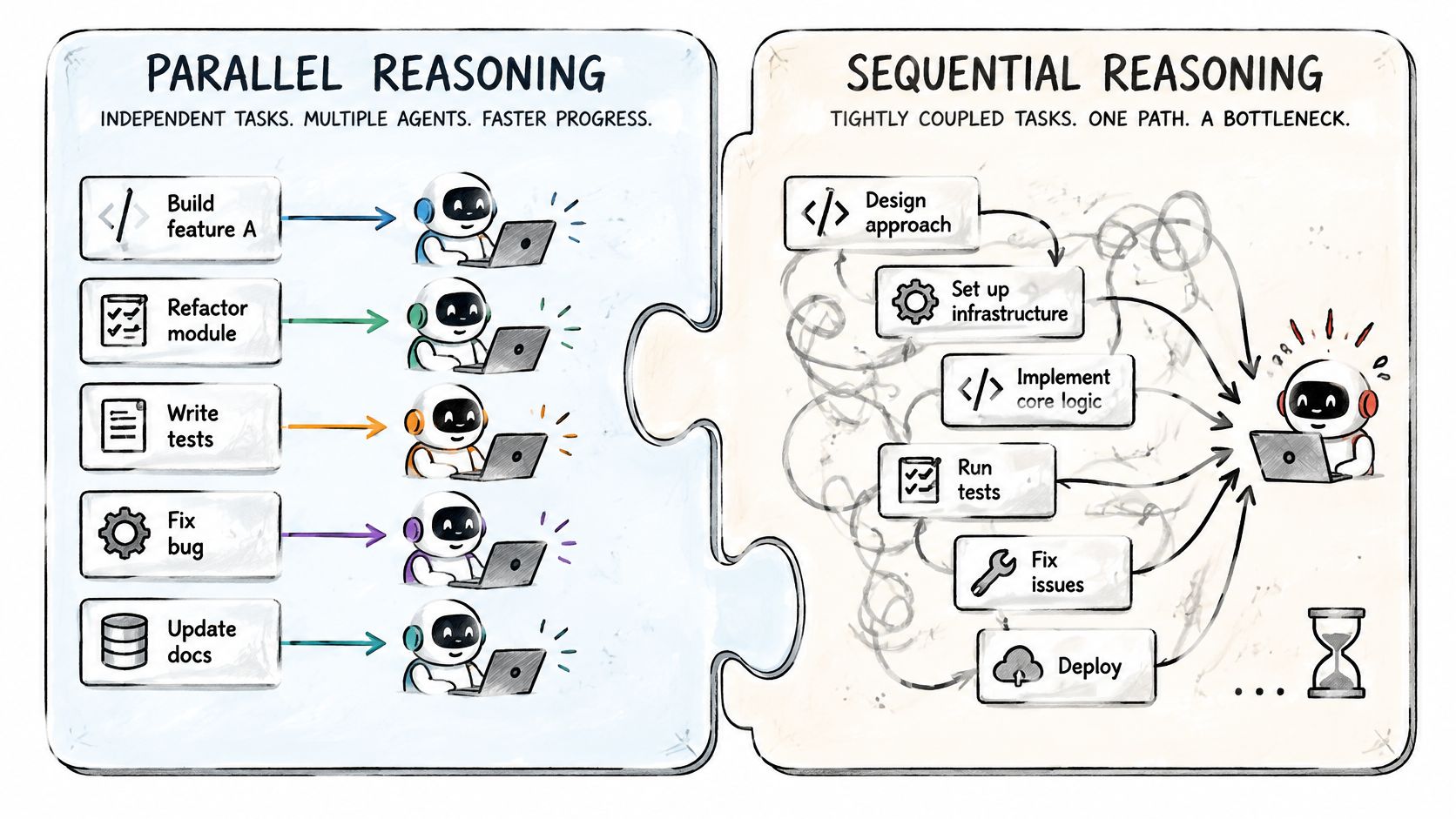
Start with one agent, and add a second only when you can name the files each one will own. Note that is a rule you might disagree with, because the usual advice is to add agents until the task feels fast.
A typical error situation: One agent changes a function signature. Another writes tests against the old signature. Both finish and both report success. Now as soon as you try to build and test it with the whole set of integration, end-to-end tests, and so on, you end up with more loops for fixing the integration issue. An important distinction to make: If you make errors in this kind of setup, this does not mean at all that you cannot work this way, but it does mean that you waste time and tokens by doing so
A kitchen shows the same limit. Four cooks can make four dishes at once, but they cannot all use one pan (without creating more issues with cleaning and oil going from one dish to another, etc - which is the mentioned token and time overhead). A shared module is the pan.
So all of this to say, the number of agents is the wrong thing to tune. What you can tune is how much of the task depends on something another worker is still deciding.
Which tasks split cleanly?
Ask two questions about each piece of the task. Can it finish without reading another piece's output? Does it write only to files that no other piece touches? Two yeses mean the piece can run in parallel. One no means it stays with a single agent.
Reading and analysis pass this test easily. Say you want to understand four modules before a migration. Four agents can each read one module and report back. Nothing they do can collide. You read four short summaries instead of one long session. Nothing needs merging, because nothing was written. Writing tests for separate modules can pass too, as long as the tests do not share fixtures.
Debugging fails it. You follow one chain of evidence. Each step depends on what the last one showed. Splitting that chain hands each worker half a story. One published study of agent systems points the same way: Google Research reports that on a planning benchmark requiring strict sequential reasoning, every multi-agent variant it tested did worse than a single agent, by 39% to 70%. That result comes from one benchmark, so it does not prove anything about your repository, but the direction fits what the signature example showed.
Review sits in the middle. For automated code review workflows, separate read-only inspections can produce independent findings. Applying those findings to shared files requires explicit edit ownership.
Sequential work can still use different tools at each stage. In AuricIDE, a combo runs a fixed list of skills in order, and each step picks its own agent and model. A combo is strictly sequential. It has no parallel branch. A failing step stops the chain. So a combo suits a pipeline, and the Fleet view suits independent pieces.
How do you run the trial?
You are comparing setups on one task, so the task must be repeatable and the scoring must exist before the first run. Write down what an accepted result looks like. Passing tests are a start. Also decide whether a reviewer would merge the diff without rework.
Then run it in three passes.
Run one agent on the whole task. Record the elapsed time, the tokens used, and whether the result passed your review.
Run two agents with the same provider and settings, each owning separate files. Record the same three numbers.
Compare the cost of each accepted result, including the time you spent merging and repairing the combined patch.
Count that last part. Leave out your own review time and parallel runs always look cheaper than they were.
The agent orchestration framework guide provides context for arranging those workflows. No benchmark will give you a break-even point for your codebase, so set the threshold yourself before you start. A fair one is that the second agent must save more of your time than it costs you in review.
Here is a result you might see. One agent takes 50 minutes and passes review. Two agents finish the edits in 30 minutes, but you spend 25 minutes untangling an interface mismatch. Two agents lost. They ran faster, though. Next time one agent writes the interface. Then you split the rest.
Clear up one confound first. If an agent sits waiting for your answer, the timing measures your absence and not the setup. In AuricIDE a card shows "Needs input" when the last lines of its output look like a prompt, and the attention list ranks error first, then blocked on input, then stalled. Whatever tool you use, check for blocked agents first. Then read the clock.
Which setup should you try first?
Try one agent first on any task that is sequential, that edits shared files, or that has no handoff rule you have tested. Move to two once the task passes both questions above.
AuricIDE can host both setups. You import each agent CLI through a dynamic provider, which is one JSON config under Settings → Agent. The panel groups running agents by repository, and you can set one aside while it keeps running. Optional dispatch assigns unblocked tickets by dependency and priority and limits retries.
Fleet controls make a messy run easier to watch, and watching it is not the same as it working.
AuricIDE offers an open-source, AGPL v3 desktop workspace for local CLI agents, shared project records, and ordered handoffs. Visit AuricIDE to test one clearly divided task against a single-agent baseline, and keep the setup that produces an accepted change at an acceptable cost.