Agent Swarm Explained: Coordination, Tasks and Pitfalls
Agent swarm basics for engineers: coordination patterns, suitable tasks, handoff mechanics, and the trade-offs to weigh before you adopt one.
Illustrative scenario: three CLI agents start on one repository. One rewrites the API client. One updates its tests. One fixes lint in the same client file. By lunch the build fails. Furthermore, while you expected three clean patches, the diff, one big blob of edits to a single file, does not show which change broke the build.
What Is an Agent Swarm, Really?
An agent swarm is several agents working toward one goal, each in its own process, passing work along and sharing project state.
The usual suspects on social media to blame are 'weak prompts' or a 'weak model'. Both matter, for sure.
But: Adding agents does not make a swarm more capable, because extra agents only help when you can tell who owns each change.
Picture three cooks and one oven. Each recipe can be correct. The meal still fails, because nobody decided who gets the oven and when.
Starting agents is easy. Running them well is where teams get stuck, because once several agents are working, nobody can say who owns which change.
Which Coordination Pattern Fits Your Task?
Pick the pattern from task dependencies, not from the agent count.
Coordination patterns and the tasks each fits
| Pattern | Shape | Fits tasks with |
|---|---|---|
| Single agent | One agent runs every step | Small, tightly sequenced or ambiguous work |
| Chain | Ordered handoffs | Each step needs the previous result |
| Tree | A planner splits branches | Parallel work that merges later |
| Graph | Agents share selected context | Dependent artifacts |
The MultiAgentBench paper tested star, chain, tree and graph structures. Graph did best in its research scenario; with the implication that more connections mean more routes to inspect, and open messaging also blurs who is responsible when one of them breaks.
AuricIDE's combos run ordered skills as chains. A combo is strictly sequential: one step runs while the rest wait. It does not build trees or graphs for you, so those stay a design choice on your side. The agent architecture guide provides context for that choice.
Practical rule: Choose the simplest pattern that preserves the task's dependencies.
In the client rewrite, the tests depend on the new interface. A chain makes that order explicit. If two agents must edit the interface itself, set ownership rules before you launch them.
How Does Work Get Passed Between Agents?
A chain step does not inherit the whole conversation. It starts with its own prompt, followed by a cleaned tail of the previous step's terminal output. The next agent still has to check what that output claims before it edits anything.
Terminal text is the common ground between agent CLIs. That is why a handoff can cross vendors.
- Each step runs locally as a child process. A crash shows as an error, not as idle time.
- The process exit status decides success or failure.
- The next step starts with its own prompt and the previous step's terminal tail.
- An error ends the combo. Later steps do not run.
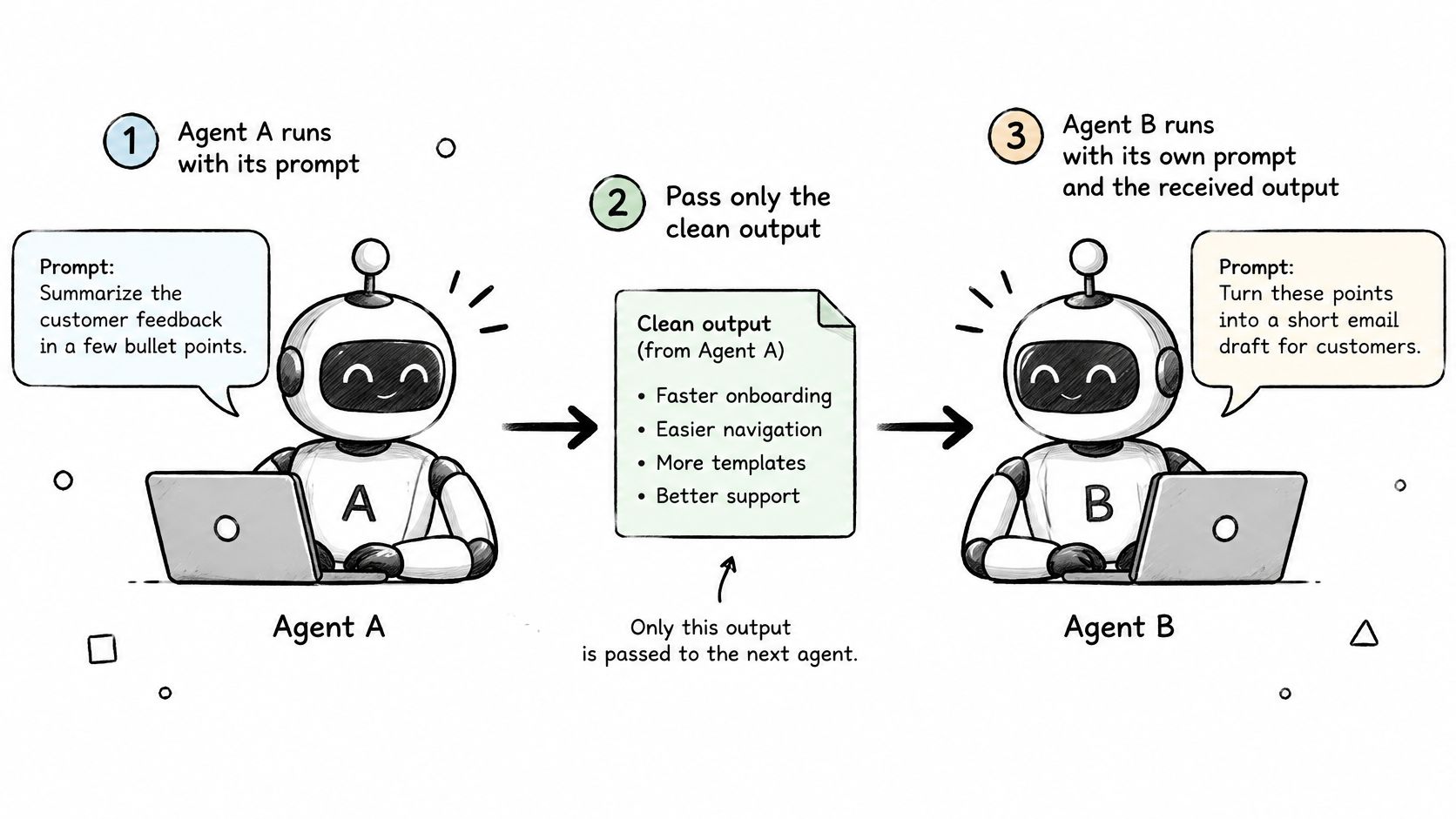
Printed output is no proof. The next agent should read the diff and run the tests before it trusts the summary. The prompt-chaining guide explains that handoff pattern.
The shared record keeps attribution possible as more agents touch the same work, because goals, tickets, requirements, test cases, dependencies and history are all exposed over MCP. Agents and the interface read the same state. A failed step then leaves a trail. The record shows which ticket changed. It shows which requirement moved. It also shows which dependency blocked the run.
A waiting agent has not succeeded. A tidy transcript cannot cover for a failed exit status.
How Do You Stop a Swarm From Talking in Circles?
Give each stage a turn or time limit. Give it an exit condition you can check.
More discussion between agents does not guarantee progress but it does guarantee token burn.
Another frame to frame it: A review step needs evidence. Agreement is not evidence.
For the client rewrite, done could mean the interface tests pass and the ticket names the cases still open. A second round should add something new to review. It should not repeat the request.
The team chooses the cap. It has a price. A run that was close to converging may stop early. No default limit is right for every task. AuricIDE does not ship a built-in time cap that settles it for you.
Write the limit next to the ticket's exit condition, so a reviewer can tell a failed implementation from a run that policy stopped. That decides whether the next move is a repair, a clarification or a retry.
How Do You Find Which Agent Broke the Build?
Start at the failed step. Then walk back through the handoffs to the change that introduced the fault.
The opening failure names no author. Several agents edited the client, and the failing test only shows a symptom of whatever they changed. To find the cause, you need the file changes and the requirement each agent was following, not just the last lines of terminal output.
Older text may have been cut from the handoff. A summary can also be wrong while sounding sure.
What should each step record?
Decide whether every step must update its ticket with the files it changed, the test results and the open requirements. That costs writing time per step. In return, you get evidence beyond a confident "done".
- Match the change: tie the failed test to the diff and the ticket that produced it.
- Check the handoff: compare what the next agent received with what the previous agent changed.
The agent-monitoring guide addresses this operator task. Terminal logs keep the text, and ticket updates keep the intent. Neither replaces reading the patch. A good trace ends with an author, a change and a reason.
What Does a Swarm Cost, and When Is One Agent Enough?
One agent is enough until the steps need separate verification. A chain pays off once each step has a clear exit condition and the next step needs a different skill or a second look.
No benchmark gives you a break-even point for your repository. Your own costs include startup time, repeated context, merge work, verification and human review.
Signals that favour a swarm or one agent
| Signal | Favours a swarm when | Favours one agent when |
|---|---|---|
| Dependency density | Subtasks rarely share files | Edits overlap |
| Parallelizability | Branches run independently | Steps wait on predecessors |
| Ambiguity | Requirements are testable | The goal keeps changing |
| Testability | Branch tests prove completion | Review alone judges success |
| Cost of inconsistency | Wrong branches are cheap to discard | Wrong requirements affect several agents |
Treat these as questions, not thresholds. Independent edits with decisive tests can justify parallel work. Overlapping changes can make coordination cost more than the extra agent saves.
The project record has running costs as well. AuricIDE keeps it in a database inside the project directory. That avoids a separate server. You still need a plan for backups, access and concurrent writes. Local processes do not guarantee privacy. Each CLI's own configuration decides what data it sends out.
The deciding question is whether the shared record can say who changed a ticket or requirement, and why. If it cannot, more agents make the work harder to coordinate. They make failures harder to trace.
Visit AuricIDE to try a bounded implement-and-review chain, then check whether its records explain a failed handoff before expanding the fleet.